


If you’re planning to start your journey in programming, one of the most common questions you’ll ask is: how to learn JavaScript and how long does it take to learn JavaScript? These questions are important because they set expectations and help you plan your learning path effectively.
JavaScript is not just another programming language—it is the backbone of the modern web. Almost every website you visit today uses JavaScript in some form. From simple animations to complex web applications like dashboards, social media platforms, and even online tools, JavaScript is everywhere.
At Tech Info Spot, we focus on providing practical and beginner-friendly guides that help you learn real-world skills without confusion. This guide is designed to give you a complete roadmap so you can go from beginner to confident JavaScript developer.
What Is JavaScript and Why Should You Learn It in 2026?

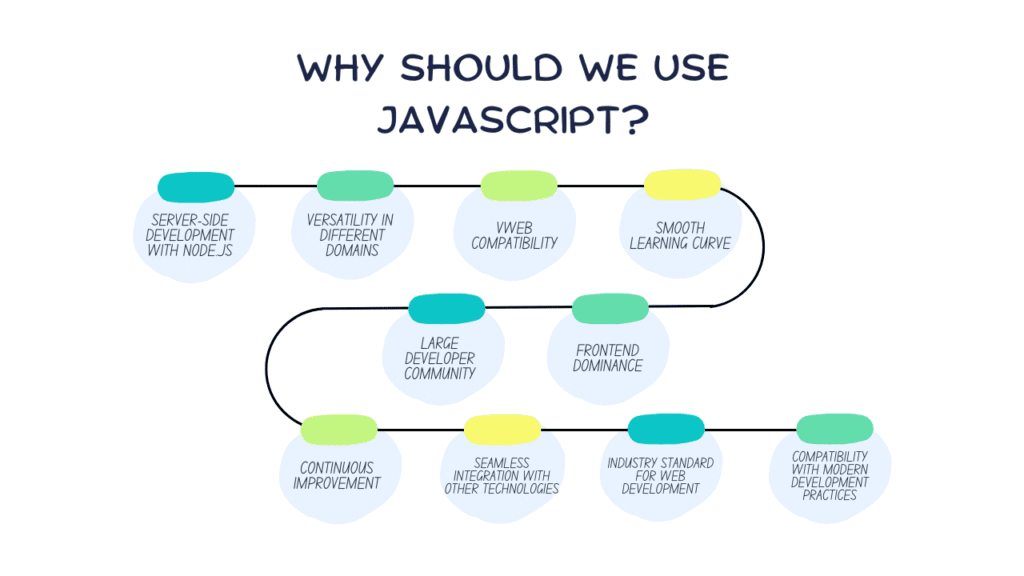
JavaScript is a scripting language that allows developers to create dynamic and interactive web pages. Without JavaScript, websites would only display static content like text and images. With JavaScript, you can add features like sliders, dropdown menus, real-time updates, and much more.
The importance of JavaScript has grown rapidly over the years. In 2026, it remains one of the most in-demand skills in the tech industry, especially in countries like the USA where digital transformation is growing fast.
Learning JavaScript gives you flexibility. You can work on frontend development using frameworks like React, or backend development using Node.js. You can even build mobile apps and desktop applications using JavaScript-based technologies.
Another major advantage is that JavaScript has a massive community. This means you’ll always find tutorials, forums, and solutions to problems you encounter while learning.
How Long Does It Take to Learn JavaScript?
One of the biggest concerns for beginners is understanding the time commitment. The truth is that how long it takes to learn JavaScript depends on your consistency, learning method, and daily practice time.
For someone who practices regularly, JavaScript can be learned step by step in a structured timeline. Initially, you will focus on understanding basic syntax and logic. As you progress, you will start building projects and solving real problems.
Here’s a realistic learning timeline:
- Basic understanding: around 2 to 4 weeks
- Intermediate level: approximately 2 to 3 months
- Advanced level: 6 months to 1 year
According to Tech Info Spot insights, learners who dedicate at least 2 hours daily and focus on practical projects often become job-ready within 3 to 6 months.
It’s important to remember that learning JavaScript is not a one-time process. Even experienced developers continue learning new concepts and improving their skills over time.
Also Read How to Find IP Address on Any Device
How Difficult Is JavaScript to Learn?
Many beginners feel intimidated before they even start. They often ask: how difficult is JavaScript to learn? The honest answer is that JavaScript is relatively easy at the beginning but becomes more challenging as you go deeper.
At the beginner level, you will learn simple concepts like variables, conditions, and loops. These are easy to understand with a bit of practice. However, as you move into advanced topics such as asynchronous programming, closures, and frameworks, things can get more complex.
The difficulty also depends on your mindset. If you approach learning with patience and consistency, JavaScript becomes much easier. The key is not to rush and not to compare yourself with others.
At Tech Info Spot, we always emphasize that learning coding is like learning a new language—it takes time, but it becomes easier with practice.
Step-by-Step Roadmap: How to Learn JavaScript Effectively

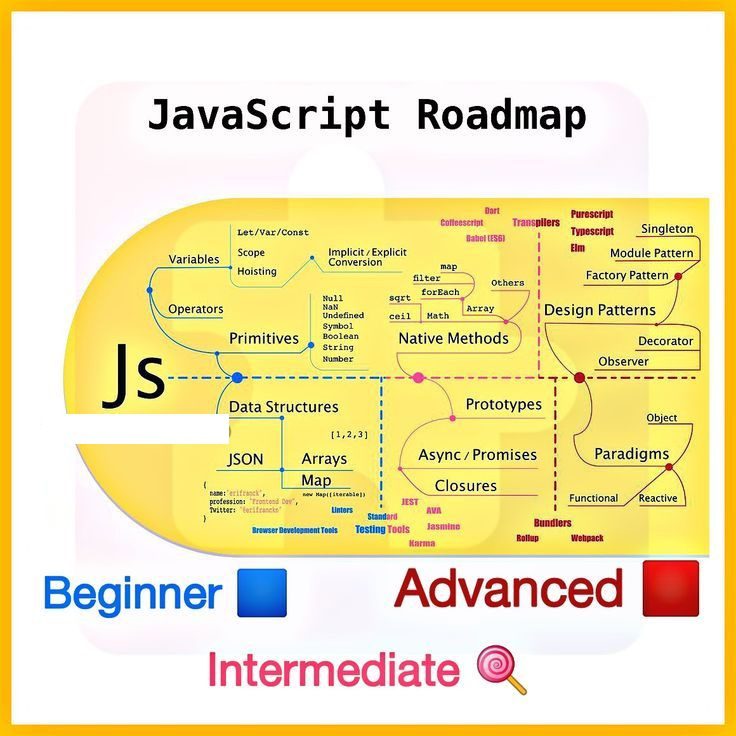
When it comes to how to learn JavaScript, having a clear roadmap can save you months of confusion. Many beginners jump from one tutorial to another without a structured plan, which slows down their progress.
The best approach is to follow a step-by-step path where each concept builds on the previous one. You start with basic concepts and gradually move toward advanced topics.
In the beginning, you should focus on understanding how JavaScript works. Learn about variables, data types, operators, conditions, and loops. These concepts are the foundation of everything you will build later.
Once you’re comfortable with basics, move on to functions. Functions allow you to organize your code and make it reusable. This is an important step toward writing clean and efficient programs.
After that, you should learn about the DOM (Document Object Model). This is where JavaScript interacts with web pages. You will learn how to select elements, change content, and respond to user actions like clicks and typing.
As you progress, start building small projects. This is where real learning happens. Projects help you apply your knowledge and understand how different concepts work together.
Eventually, you will move into advanced topics like APIs, asynchronous programming, and modern JavaScript features. These skills are essential for real-world development.
How to Learn JavaScript for Free
One of the best things about learning JavaScript is that you don’t need to spend money to get started. There are plenty of high-quality free resources available online.
You can start with platforms that offer structured courses and interactive coding exercises. These platforms help you learn by doing, which is much more effective than just reading or watching videos.
YouTube is also a powerful resource. Many experienced developers share tutorials, projects, and tips for beginners. However, it’s important to choose the right content and not jump between too many videos.
At Tech Info Spot, we recommend using a combination of video tutorials and hands-on practice. This approach helps you understand concepts and apply them immediately.
Also Read this : How to Create Drop Down List in Excel
Best Strategy to Learn JavaScript Faster
Learning JavaScript quickly is not about rushing through topics but about learning efficiently. Many beginners waste time by focusing too much on theory and not enough on practice.
A smart learning strategy involves applying what you learn as soon as possible. For example, if you learn about loops, create a small program using loops. If you learn about functions, build something that uses functions.
Consistency is the most important factor. Even if you study for one hour daily, you will make steady progress over time.
Here are some key strategies to keep in mind:
- Focus on understanding concepts instead of memorizing
- Practice coding every day, even for a short time
- Build small projects regularly to apply your knowledge
- Learn how to debug and fix errors
- Avoid switching between too many tutorials
Common Mistakes Beginners Should Avoid
While learning JavaScript, beginners often make similar mistakes that slow down their progress. One of the biggest mistakes is relying too much on tutorials without practicing. Watching videos can give you the illusion of learning, but real understanding comes from writing code yourself.
Another common mistake is trying to learn everything at once. JavaScript is a vast language, and trying to cover too much in a short time can lead to confusion.
Many beginners also skip fundamentals and jump directly into frameworks. This makes it difficult to understand what’s happening behind the scenes.
Based on experience shared by Tech Info Spot, the most successful learners are those who focus on basics, practice regularly, and build projects consistently.
Real-World Projects You Should Build
Building projects is one of the most effective ways to learn JavaScript. It helps you apply concepts and gain confidence.
Instead of just following tutorials, try creating your own projects. Start with simple ideas and gradually increase complexity.
Some useful beginner-friendly project ideas include:
- A simple calculator for basic operations
- A to-do list application to manage tasks
- A digital clock or timer
- A weather app using an API
These projects may seem simple, but they help you understand how JavaScript works in real applications.
Career Opportunities After Learning JavaScript

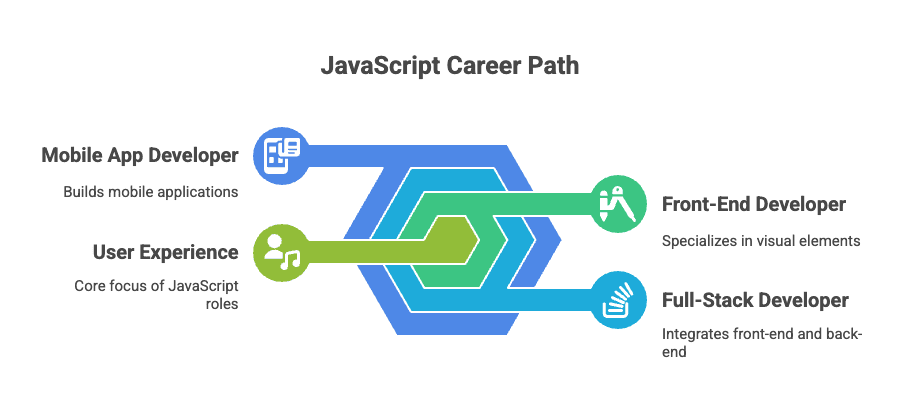
Once you gain a solid understanding of JavaScript, many career opportunities become available. You can work in web development, app development, or even software engineering.
JavaScript is used in almost every industry, which makes it a valuable skill. Companies in the USA and around the world are constantly looking for developers who can build fast and interactive applications.
Freelancing is also a great option. Many developers earn money by building websites and applications for clients globally.
How Much Can You Earn After Learning JavaScript?
The earning potential for JavaScript developers is quite high, especially in developed markets like the USA. Beginners may start with entry-level salaries, but as their skills improve, their income increases significantly.
Freelancers can also earn a good income by working on projects and building a strong portfolio.
At Tech Info Spot, we always encourage learners to focus on skill-building first. Once you have strong skills, earning opportunities will follow naturally.
How to Stay Motivated During Your Learning Journey
Learning JavaScript can feel overwhelming at times, especially when you face errors or difficult concepts. Staying motivated is crucial for long-term success.
Setting small and achievable goals can help you stay focused. Instead of trying to learn everything at once, focus on completing one topic or project at a time.
Tracking your progress is also important. When you see how much you’ve improved, it boosts your confidence and keeps you motivated.
Quick Summary
- JavaScript is essential for modern web development
- It takes around 3–6 months to become job-ready
- It is beginner-friendly but requires consistent practice
- Free resources are enough if used correctly
- Building projects is the fastest way to learn
Final Thoughts
Learning how to learn JavaScript is one of the most valuable investments you can make in your future. It opens doors to countless opportunities, from freelancing to high-paying jobs in the tech industry.
The journey may seem challenging at first, but with the right strategy and consistent effort, you can achieve your goals.
At Tech Info Spot, our mission is to guide you step by step so you can build real skills and succeed in your tech journey.Stay connected with Tech Info Spot for more in-depth tutorials, guides, and expert advice