


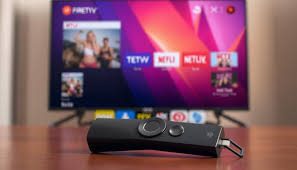
The way people consume television has changed. Viewers want flexibility, lower costs, and access to global channels without being locked into long contracts. This is where firestick iptv becomes a major topic of interest. Before subscribing, we must understand how it works, what it offers, and what factors truly matter.
This guide covers every critical detail you need before choosing a firestick iptv service.
What Is Firestick IPTV and How It Works
Firestick IPTV refers to IPTV services that run on the Amazon Fire TV Stick device. The Fire TV Stick connects to your television via HDMI. It uses your internet connection to stream content instead of traditional cable or satellite signals.
The process is direct:
- Connect Fire TV Stick to your TV
- Connect to WiFi
- Install an IPTV compatible app
- Enter subscription details
- Start streaming live TV and on demand content
IPTV stands for Internet Protocol Television. Instead of broadcasting through cable networks, content streams over the internet. This allows access to thousands of channels, movies, sports, and international programming.
Key Features You Should Expect
When evaluating a firestick iptv subscription, features define value. We focus on measurable benefits.
1. Channel Variety
Most services offer:
- Local channels
- International channels
- Sports networks
- Movie channels
- News stations
- Kids programming
Premium providers can offer 5,000 to 20,000 live channels.
2. Video Quality
Streaming quality usually includes:
- SD
- HD
- Full HD
- 4K
Stable internet speed determines performance. For HD streaming, at least 10 Mbps is recommended. For 4K, 25 Mbps or higher ensures smooth playback.
3. Video On Demand Library
Many providers include:
- Thousands of movies
- TV series collections
- Recently released content
- Multiple language options
4. Electronic Program Guide
An EPG displays program schedules. This feature improves navigation and enhances user experience.
Benefits of Choosing Firestick IPTV
Choosing firestick iptv provides clear advantages.
Lower Monthly Costs
Traditional cable subscriptions often cost $60 to $120 per month. IPTV services typically range from $10 to $20 monthly. Annual plans reduce costs further.
No Long Term Contracts
Most IPTV subscriptions operate monthly or quarterly. You can cancel anytime.
Global Accessibility
IPTV removes geographic restrictions. You gain access to content from the US, UK, Europe, Asia, and the Middle East.
Portable Streaming
The Fire TV Stick is compact. You can carry it while traveling and connect it to any compatible TV.
Requirements Before Subscribing
Before purchasing a firestick iptv plan, ensure the following:
Stable Internet Connection
Minimum recommendations:
- 10 Mbps for HD
- 25 Mbps for 4K
- Wired Ethernet adapter improves stability
Compatible Firestick Device
Supported devices include:
- Fire TV Stick Lite
- Fire TV Stick 4K
- Fire TV Stick 4K Max
Updated firmware ensures better compatibility.
Reliable IPTV App
Popular IPTV apps for Firestick include:
- IPTV Smarters
- TiviMate
- XCIPTV
- Perfect Player
Choose apps with strong user reviews and consistent updates.
How to Evaluate IPTV Providers
Not all services deliver the same performance. We analyze providers based on these criteria.
Server Stability
Frequent buffering indicates weak infrastructure. High quality providers use multiple servers to balance traffic.
Trial Availability
Short trials allow testing channel stability and video quality.
Customer Support
Responsive support reduces downtime and frustration. Live chat and email support are ideal.
Payment Options
Secure payment gateways increase trust. Avoid providers that request unsafe payment methods.
Understanding Legal Considerations
IPTV itself is legal technology. However, content licensing differs between providers. We must verify the legitimacy of the service before subscribing.
Check for:
- Clear company details
- Transparent subscription structure
- Public contact information
Responsible usage protects your privacy and avoids service interruptions.
Common Problems and How to Avoid Them
Even high quality firestick iptv services can face issues. Preparation reduces risk.
Buffering Issues
Solutions:
- Upgrade internet speed
- Use Ethernet adapter
- Restart router
- Close background apps
App Crashes
Solutions:
- Update the IPTV app
- Clear cache
- Restart Firestick
- Ensure sufficient storage
Channel Downtime
Temporary outages happen. Choose providers with backup streams.
Security and Privacy Measures
Streaming over the internet requires awareness.
- Use secure WiFi networks
- Avoid sharing subscription credentials
- Update device software regularly
Maintaining privacy improves long term reliability.
Cost Breakdown and Value Comparison
| Feature | Traditional Cable | Firestick IPTV |
| Monthly Cost | $60 to $120 | $10 to $20 |
| Contracts | 12 to 24 months | Flexible |
| Installation | Technician required | Self setup |
| Channel Count | Limited | Thousands |
| International Channels | Limited | Extensive |
The savings over one year can exceed $600.
Is Firestick IPTV Worth It
For viewers who want:
- Cost efficiency
- Global channel access
- Flexible plans
- Portable streaming
The answer is yes. Firestick IPTV offers a scalable alternative to cable.
Conclusion
The shift toward streaming continues to accelerate. Firestick IPTV stands out as a flexible, cost effective option for modern viewers. With the right provider, stable internet, and compatible app, we unlock thousands of channels and on demand content at a fraction of cable prices. Careful selection ensures smooth streaming, strong performance, and long term value.
FAQs
1. What internet speed is required for firestick iptv?
At least 10 Mbps for HD streaming. For 4K content, 25 Mbps or higher is recommended.
2. Can we use firestick iptv on multiple devices?
Some providers allow multi connection plans. Always confirm before subscribing.
3. Does firestick iptv support sports channels?
Most providers include major sports networks and pay per view events.
4. How do we install firestick iptv apps?
Install from the Amazon App Store or sideload using Downloader app.
5. Is firestick iptv better than cable TV?
It offers lower cost, more channels, and flexible subscriptions compared to traditional cable.
For more information: Fire IPTV Hub


