


Introduction
Customer management is crucial to modern companies. It allows organisations to build relationships, customise experiences, and respond quickly to client needs. In a competitive environment, companies rely increasingly on technology to simplify their work and centralise their data. Microsoft provides several amazing technologies that improve communication, collaboration, automation, and data analysis. These solutions help companies improve efficiency and customer service.
Microsoft Dynamics 365: The Core of Customer Management
Dynamics 365 is Microsoft’s main CRM. The goal is to centralise customer data. It stores your contact information, communication history, sales activity, service records, and marketing interactions. Since it integrates with other Microsoft products, employees from various departments may receive the information they need without switching computers.
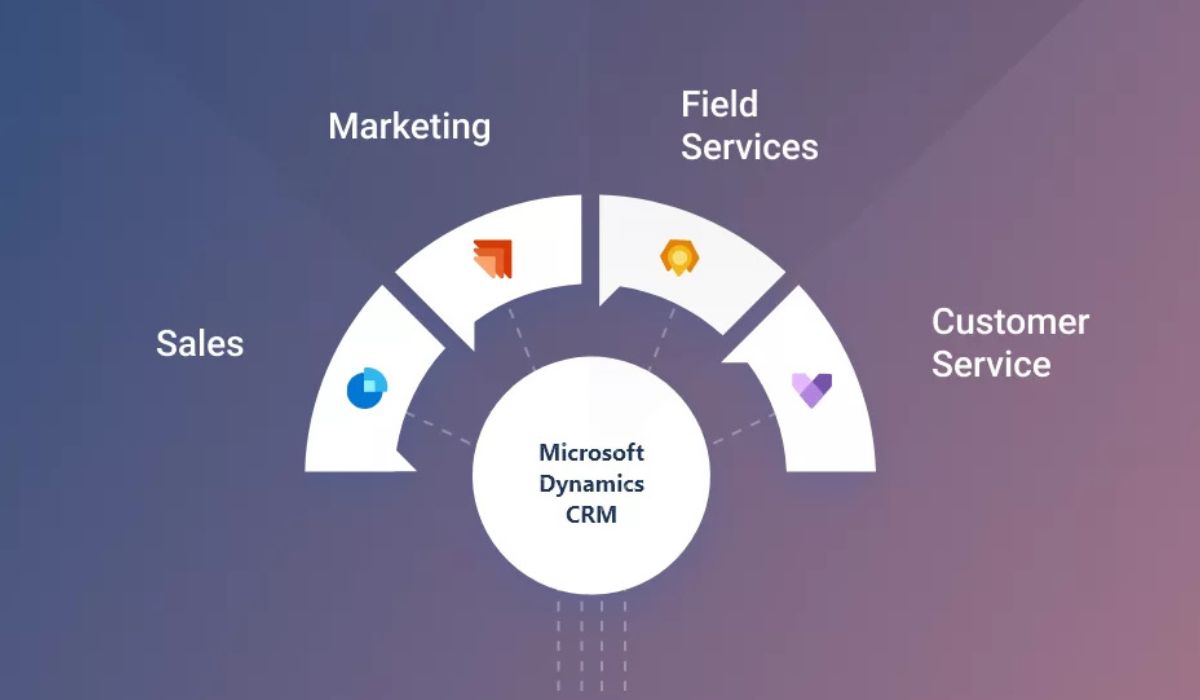
Teams can track leads and opportunities and learn about client behaviour and purchases using the Dynamics 365 Sales module. Customer Service equips support staff to answer queries, resolve issues promptly, and remember discussions. The Marketing module allows automated marketing, customer grouping, and lead nurturing. The Field Service module helps physical service organisations schedule, dispatch, and communicate with clients on-site.
CRM Dynamics 365’s features include process integration, automation, and AI-powered analytics. This simplifies department collaboration and organises the customer lifecycle.
Microsoft Teams: Enabling Collaborative Customer Engagement
Teams help firms collaborate, especially when employees work from home or in a hybrid setting. Employees may gather, share files, and discuss subjects in one spot. This collaborative room helps manage customers since many customer-related professions require sales, support, marketing, and operations to collaborate.
Customer service teams are useful too. Virtual meetings allow organisations to provide customer support, technological demos, comments, and consultations. It connects with Dynamics 365, so employees can access client histories and CRM information in Teams without switching applications. Teams combine real-time communication and data access to help firms meet customer needs faster.
SharePoint: Organising Customer Documents and Knowledge
SharePoint is Microsoft’s principal tool for document storage, management, and collaboration. SharePoint may assist companies that manage a lot of customer data, including contracts, bids, reports, and service papers, to keep them safe and accessible to team members.
Many companies build internal knowledge bases with SharePoint. These may include training materials, customer manuals, troubleshooting tools, or historical data. These knowledge bases maintain all the information customer support staff need in one place and up to date, helping them answer problems quickly.
SharePoint improves with automation. Businesses can simplify document approvals, modifications, notifications, and version control using SharePoint and Power Automate. This reduces labour and improves accuracy.
Power Automate: Simplifying Customer Workflows Through Automation
Microsoft Power Automate automates repetitive job tasks. It allows firms to automate processes that integrate Microsoft and third-party programs.
Customer management often uses Power Automate to allocate new leads. If a consumer fills out a form or asks a question, Power Automate may immediately notify the correct sales representative. It can also send follow-up messages, move data between Outlook and Dynamics 365, notify teammates on teammates’ channels, and manage SharePoint files. Because of its drag-and-drop interface, employees can automate without any IT knowledge.
Automation reduces errors and speeds up response times, making consumers happy. It enables teams to focus on customer relationships instead of tedious tasks.
Microsoft Excel: A Classic Tool Still Essential for Customer Insights
Excel remains popular among organisations despite new technology. Its advanced computing, filtering, and data analysis features make it ideal for customer lists, imported data, and reports. Many teams still use Excel to analyse sales, group clients, and calculate performance.
Excel becomes much more helpful with Dynamics 365 and Power BI. You may export CRM data to Excel for analysis or import it back after cleaning or rearranging. This back-and-forth connectivity ensures accurate customer records across platforms.
Microsoft Viva: Enhancing Employee Knowledge and Customer Experience
Microsoft Viva improves workplaces, engages people, and helps them flourish. Though it doesn’t directly contact customers, it affects how firms treat them. Well-trained and knowledgeable employees provide better service and make more confident decisions.
Viva Learning offers all training resources in one location, helping salespeople and customer service workers better. AI organises corporate knowledge and makes it easy to locate, so personnel can always find customer information. Viva Connections sends company updates and messaging using Microsoft 365 to keep everyone informed.
By improving worker learning and communication, Viva indirectly benefits customers.
How Microsoft Tools Work Together to Create a Complete Customer Experience
Using these tools together shows Microsoft’s ecosystem’s capability. Each assists with a different area of customer management, but their collaboration adds value. An online client query may go into Dynamics 365, initiate tasks in Power Automate, send alerts in Teams, start follow-up conversations in Outlook, save associated documents in SharePoint, and show up in Power BI analytics dashboards for tracking and improvement.
This level of integrated efficiency helps organisations organise, reduce manual labour, and deliver consistent customer service. Each department may monitor consumer interactions, preventing misunderstanding, misinterpretation, and data fragmentation.
The Advantages of Using Microsoft Tools for Customer Management
Businesses that use Microsoft’s customer management ecosystem experience noticeable improvements in their daily operations. Structured and automated workflows improve efficiency. Teams work better when they can share and use information in real time. Data drives choices when analytic tools reveal key trends and performance metrics. Customers gain faster responses, better customisation, and a better experience.
Microsoft’s products are also broadly applicable. Microsoft solutions can handle thousands of customer interactions each day for any size organisation.
Last Thoughts
Microsoft offers one of the most comprehensive and integrated customer management systems. Communication, collaboration, analytics, and automation are all part of a unified system that helps organisations stay organised and responsive. Dynamics 365, Outlook, Teams, SharePoint, Power Automate, Power BI, Excel, and Viva can streamline and data-driven customer management.
Also, read: Dynamics 365 Basics: Enhance Reporting Accuracy


